
微軟Outlook可以集中安全地關聯您所有的電子郵箱帳戶和日曆。不管您正在管理您的工作電子郵件還是和朋友們一起組織一場大型活動,Outlook都可以讓保持高效變得簡單。
當您關聯Todoist與Outlook時,您可以保持您的生活完全井然有序,這樣您就可以完成全部事項並享受您的旅程。輕鬆將電子郵件添加到您的待辦清單上,這樣您就可以在日程表裡處理它們。直接從您的Outlook收件箱中管理您的任務、截止日期、項目、標籤和優先級,您將再也不會錯過任何一個跟進事項。
功能
-
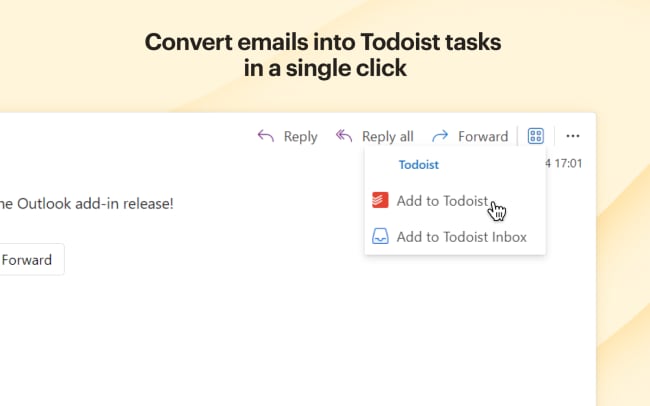
Efficiently convert emails into tasks in a single click — achieve inbox zero by adding emails to Todoist so you can take action on them later.
-
Add tasks from any Outlook client, whether you use Outlook on desktop, web (Microsoft 365 and Outlook.com), or mobile.
-
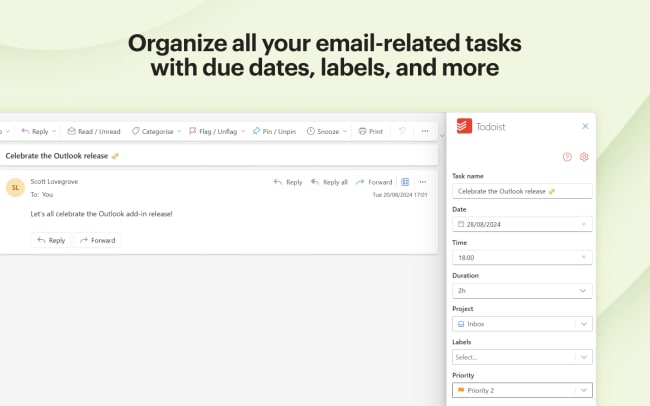
Organize all your email-related tasks into appropriate projects with correct dates and times, priority levels, and labels, all within Outlook.
-
On a paid Todoist plan, the integration can also automatically generate an email summary and action items for your task.
-
When you’re ready to tackle your task, get right back to your email from Todoist by clicking the hyperlinked task name.

Can’t find the integration you’re looking for?
Integrate with thousands of other apps via our automation partners. Or, explore our API to build your own extensions or integrations.